

Reducing Inbox Noise: Using Amazon Nova Pro to Automate SMS Compliance
As a developer, there is nothing more frustrating than building a high-scale messaging platform only to have the "human" inbox flooded with machine-generated noise. When you’re managing thousands of outbound SMS campaigns, the inbound responses often include automated "line not monitored" alerts, emergency redirects, or system opt-in confirmations.
At CloudContactAI, we faced a classic "needle in a haystack" problem: our users were manually reviewing hundreds of messages just to find the one or two that actually required a human response.
To solve this, we leveraged Amazon Nova Pro to build an intelligent, GenAI-powered filtering layer. Here’s how we did it.
The Architecture of a Smart Filter
The goal was simple: pass every inbound SMS through an AI model to determine if the sender is a human or a machine, then take immediate action in the CRM.
1. The Prompt Engineering
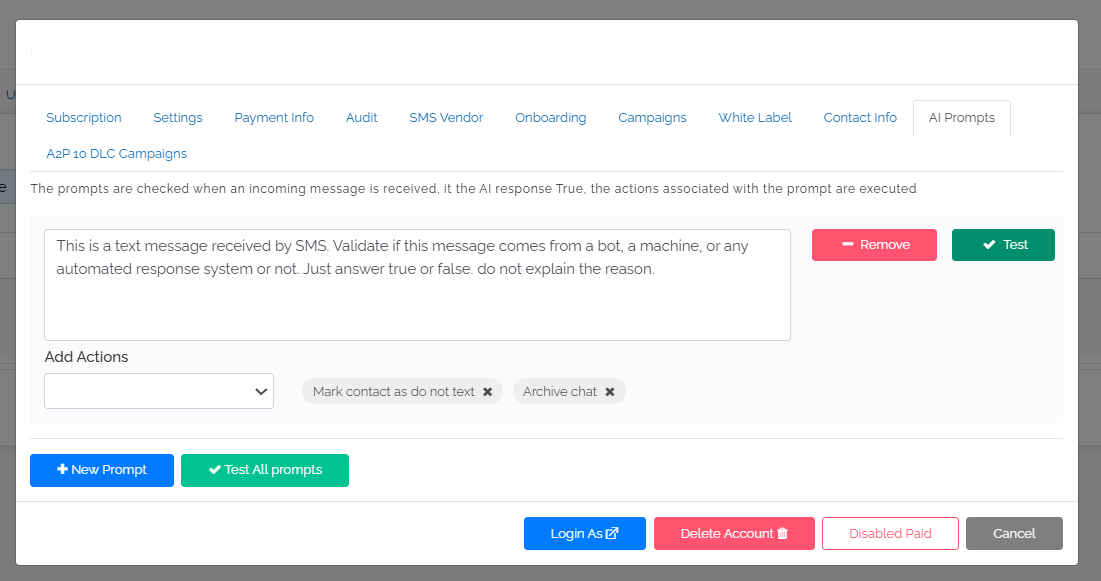
The core of this functionality lies in a strictly constrained prompt. To ensure the output is programmatically actionable, we require a boolean response without any prose.
The System Prompt:
"This is a text message received by SMS. Validate if this message comes from a bot, a machine, or any automated response system or not. Just answer true or false. Do not explain the reason."
2. Evaluating the Data
We tested the model against common "dead-end" responses that typically clutter an inbox:
- System Alerts: "This line is not monitored for messages. Please call 229-391-4100..."
- Emergency Redirects: "If this is an emergency, please call 911."
- Carrier Notifications: "You are now opted-in. To opt out, reply STOP."
By feeding these into Amazon Nova Pro, the model accurately returns True for automated responses, allowing our backend to trigger automated workflows.
Automating the Workflow: Actions & Archiving
Detecting the noise is only half the battle; the second half is cleaning it up. We integrated specific actions into our production environment based on the AI’s evaluation:
- Mark as "Do Not Contact" (DNC): If the response is
True(Machine), the contact is flagged to prevent future wasted spend and compliance issues. - Archive Chat: The message is immediately moved from the active inbox to an archived folder.
The Logic Flow:
// Example logic for processing the Nova Pro output
const messageAnalysis = await getAmazonNovaProResponse(inboundSMS);

if (messageAnalysis.toLowerCase().includes("true")) {
    // Action: Flag as DNC and clean up the UI
    markContactAsDoNotContact(contactID);
    archiveChatFromInbox(chatID);
    console.log("Automated response detected. Contact flagged and archived.");
} else {
    // Action: Leave in inbox for human engagement
    notifyAgent(chatID);
}
Updated 8 months ago